
What does a CRM need to be AI-compatible?
The question is no longer whether to use AI, but whether your CRM is ready for it
A CRM is AI-compatible when its data is clean and connected, when other systems can read and write to it, and when it captures the complete context of each customer. Without this, any AI assistant or agent works blind.
Today almost every CRM announces AI features. But in practice, most SMBs discover the problem isn't the tool—it's what's inside: duplicate records, WhatsApp conversations that never make it into the system, sales stages that each salesperson interprets their own way.
This article explains what a CRM must have for AI to deliver real value and how to take your business to an AI-First model, where internal processes are designed from the start so people and AI agents work together.
What AI-First means in internal processes
AI-First means designing each process by first asking what part AI can do and what part needs human judgment. It's not about layering a chatbot on top of what already exists.
You can see the difference in how you approach the same process:
| Approach | How it works in practice |
|---|---|
| Traditional | The sales rep records the call by hand, if they remember, and the manager reviews the pipeline once a week |
| AI as a complement | An automatic email summary is added, but the workflow remains the same |
| AI-First | Every interaction is captured automatically, AI qualifies the lead, suggests the next step, and alerts when a deal cools off; the sales rep decides and negotiates |
Three principles define it:
- Data is captured at the source. No one should copy information from one system to another.
- AI handles the repetitive work and people make the important decisions. Each process has defined where human intervention occurs.
- Every process leaves a trail. What AI does is recorded, can be audited, and can be corrected.
The 7 requirements of an AI-ready CRM
An AI-ready CRM meets seven conditions. If any of the first three are missing, no AI feature will work properly.
| # | Requirement | What it means | Sign it's missing |
|---|---|---|---|
| 1 | Clean and structured data | A single record per customer, mandatory fields, sales stages with clear criteria | Duplicate contacts, empty fields, each salesperson uses the stages their own way |
| 2 | Omnichannel history | Email, WhatsApp, calls, forms, and meetings are all recorded in the customer profile | Conversations live on each salesperson's phone |
| 3 | Open and documented API | Other systems and agents can securely read and write data | Export to Excel only |
| 4 | Events and webhooks | The CRM alerts when something happens (new lead, stage change, payment) to trigger actions | Automations depend on someone reviewing daily |
| 5 | Unstructured context | Saves notes, transcriptions, documents, and complete emails, not just fields | Only one single-line "comments" field |
| 6 | Permissions and traceability | Defined roles, log of who (person or AI) changed what and when | No way to know who modified a record |
| 7 | AI model connectivity | Native integration or via standards like MCP (Model Context Protocol) so external assistants can query and act | AI exists only as an isolated button within the CRM |
One point is often overlooked: AI needs the why, not just the what. Knowing that a deal was lost helps little; knowing it was lost due to price against a specific competitor allows AI to detect patterns and suggest actions.
In Chile and LATAM there's an additional requirement: integration with WhatsApp Business, the main sales and customer service channel for many SMBs. A CRM that doesn't capture WhatsApp leaves out most of the customer context.
How to redesign internal processes with an AI-First approach
The CRM is the center, but real change happens in the processes. For each area, it's important to define what AI does, what the person decides, and what CRM data makes it possible.
| Area | What AI does | What the person decides | CRM data that enables it |
|---|---|---|---|
| Sales | Qualifies leads, drafts follow-ups, alerts stalled deals, prepares summaries before each meeting | Negotiation, pricing, closing | Interaction history and well-defined stages |
| Customer Support | Answers frequent questions 24/7 via WhatsApp and web, classifies tickets, escalates complex cases | Sensitive cases, complaints, exceptions | Customer profile, purchase history, knowledge base |
| Marketing | Segments audiences, personalizes messages, identifies which campaigns generate customers, not just clicks | Strategy, positioning, budget | Source of each lead and its final outcome |
| Operations | Schedules, sends reminders, generates quotes and documents, updates statuses | Approvals and priorities | Products, prices, availability and status |
| Management | Summarize business status, project sales, identify risks in key accounts | Management decisions | Updated pipeline and reliable metrics |
To redesign a process, this method works well for SMBs:
- Map the current process step by step, including who performs each step and how long it takes.
- Label each step as repetitive, judgment-based, or customer-relationship focused.
- Assign repetitive steps to AI and define the exact point where a person reviews or approves.
- Identify what data the AI needs at each step and ensure your CRM captures it.
- Measure before and after: response time, conversion rate, hours freed up.
Checklist: Is your CRM ready for AI?
If you answer "no" to more than three points, the priority is organizing your data and processes before investing in AI features.
- Each customer has a single record with no duplicates
- Funnel stages have documented entry and exit criteria
- WhatsApp and email conversations are stored in the customer record
- The reason for each won or lost deal is recorded
- Your CRM has API and webhooks available in your plan
- Roles and permissions are defined by department
- You can see who modified each piece of data and when
- There's an up-to-date knowledge base (products, prices, FAQs)
- The team uses the CRM daily, not just for reporting
- It's defined which decisions AI can make on its own and which require approval
Common mistakes when integrating AI into your CRM
The most expensive mistake is buying AI before organizing your data: AI amplifies what it finds, including disorder.
- Automating a broken process. If your current process doesn't work, AI will just make it fail faster.
- Leaving AI unsupervised. An agent responding to customers without clear limits can promise prices, timelines, or conditions your company can't deliver.
- Not training your team. If salespeople see AI as a threat or a burden, they stop logging data and the system loses value.
- Choosing your CRM for its AI features. It's better to choose it for API quality, integrations, and data model; AI can be connected later.
- Ignoring data protection. Customer data sent to AI models must be handled with the same privacy rules as everything else, considering Chile's new Law 21.719 on personal data protection.
A 4-stage roadmap
Transitioning to an AI-First model works better in stages, and each one needs the previous one to be resolved.
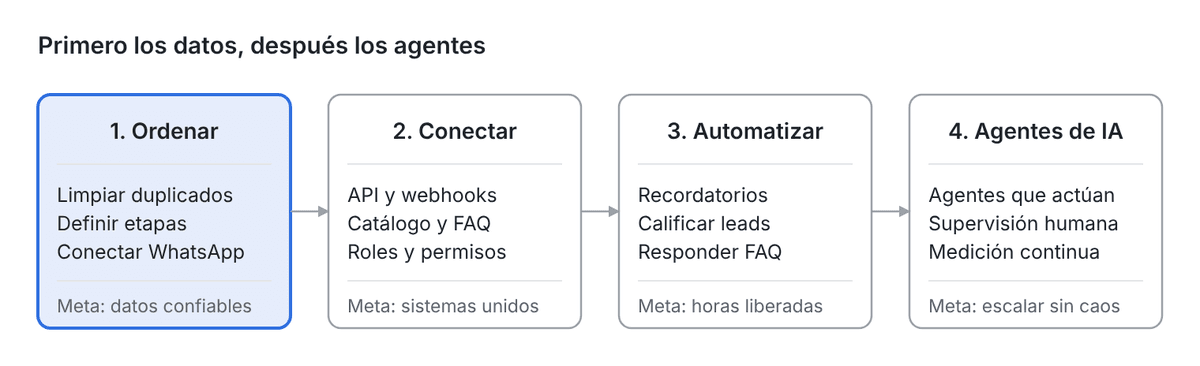
Skipping stage 1 is the most common reason AI projects fail to deliver results.
Conclusion
An AI-ready CRM isn't defined by its AI features, but by the quality of its data, its ability to integrate, and the context it maintains for each customer. AI is the final layer; the foundation is your processes.
Adopting an AI-First approach means redesigning work so AI handles the repetitive tasks and your team focuses on what drives value: understanding customers, negotiating, and making decisions. For a small business, that means responding faster, selling more with the same team, and growing without operations becoming chaotic.
The best way to start is small: pick a process, organize its data, automate it, and measure. Then repeat.
Is your CRM ready for AI?
At FoundersLab we help SMBs in Chile and LATAM organize their data, connect their CRM with WhatsApp and other systems, and design AI-First processes with agents that work alongside your team. We're not an agency: we work as your technology partner.
Schedule a free diagnostic consultation and let's review together what stage your company is at and which process should be transformed first.